mRockstar–An Upcoming Social Network Site

mRockstar.com, it’s social networking website plus a music based community. The pre-phase of the website was launched on April 5, 2011 to let people reserve their mRockstar Usernames

Comodo Internet Security 2011 Pro 1 Year License Key

If you buy this product from the Official Webpage, it will cost you more than $49 per year. But now you’ve got a chance to get it for absolutely free. You don’t need any license key for this package because it has already been integrated with the package. Just download it and you’ve a fully featured Internet security system which will protect your PC from Viruses, Trojans, Malwares, Hackers and every type of threat that can harm your computer. Grab this offer

Download Avast 6 Home Edition 1 Year License Key

Avast antivirus is one of the top leading antivirus and it is available for free download.You will get a fully functional 30 day trial version of avast if you download directly from their website.To activate it for one year you need to register with them.Once registered you will get your Serial license key into your mailbox.

Techinline – Remote Support Software


Techinline is remote support software that works within your web browser. The software is best suited for providing online technical support as well giving out presentations and demonstrations to your clients and colleagues.
In this age of fast moving world, technology has allowed us to perform even those tasks that were impossible to achieve earlier. The remote desktop recovery is the latest buzzword in the IT industry. Techinline gives you the freedom to connect with your clients anytime and anywhere in the world. All that is required is a computer with a moderate internet connection with Microsoft Windows installed on it. The software runs only on the windows platform and is fully compatible with Vista and Windows 7.
INSTALLATION:
The installation of techinline doesn’t require you to download any installer or any other executable file. The entire process is automated which starts with the installation of a simple plugin. The rest of the instructions on the screen are self-explanatory and helpful. You should not face any problem installing the software. If you need help then feel free to contact the customer care or visit the FAQ section on the website. For your convenience screenshots have been placed here

FEATURES OVERVIEW:
The software has all the features that are required in typical remote connection software. But still we found some features of this software better than the others. The 2 Way Desktop Exchange allows you to share your desktop with the remote computer on a 2 way connection where you can chat and interact using the chatting and messenger features with the person sitting on the other side. You can also request or send files using the FTP File transfer manager. Its interface is well designed and suited for a variety of uses and applications. This feature also allows the remote person to take control of all the important processes of the computer like rebooting, file management, etc. This can be helpful in those scenarios where you want the online support and help of the operators sitting on the other terminal.
Another striking feature is its ability to connect to the computers that are hidden behind proxies. You can connect to large corporate networks without any complex manipulations or settings of the connection or of the network. All the activities that you perform during your sessions will be recorded and stored on a log that will be available in a variety of formats like PDF, Excel, Word, etc. Talking about the interface design, the company has really worked upon it and must also do some more so that it can become more intuitive and ready to use.
Overall we found the product an interesting bet to make. Being priced at $30 per month it is worth giving a try to it. For more details on pricing visit Techinline. The software is best suited for the service oriented companies that will not only help them to connect to their clients faster and better but they also will cut down on the workforce that was earlier needed for the on site support.

Make 2 Free Calls Per Day Anywhere in The World

Now you can Make 2 Free Calls Per Day Anywhere in The World. Yes you read it correct! 2 Free calls per day anywhere in the world. You can do this by using EvaPhone. EvaPhone provides Internet telephone calls for free. They let you make PC-to-phone free international calls. All you need is a computer to start making free VoIP calls using Internet to phone.
You Can Use these Free calls to call any number around the world but for just 1minute. Although Time duration is just 1 minute per call but I guess its good opportunity for people who want to call others by some international numbers and play a prank on their friends. Share your views about it. Also share about any pranks you plan to play with your friends using it.

Some Useful Tips To Maintain a Virus Free Computer


Are you fed up with the number of viruses infecting your computer? Then here in this interesting post you will find me telling you about how the various worms, viruses and spywares find their way into your precious computer. Most of the time, they are harmful probably aiming to steal your personal information. In this case, we are more concerned about those that could cause your computer to hang up. Follow these six easy to do tip that can free your computer from viruses.

1. E-mails:
This is the most of the common way through which spywares, worms, Trojans and viruses find their easy way into your computer. When you have your own private emails, increase the privacy settings and never ever open unsolicited and unknown emails, as they may be the source of the much awaiting harms that can damage your whole computer. To avoid this harming your computer, use very good anti-spam software. Never click links in e-mails if you are not sure what are they.
2. USB thumb or pen drives:
This is another and most common source that could affect your computer in a number of ways. The best option to avoid this from happening is by performing a virus scan before copying any data onto your computer and another small tip is not to double click the pen drive for opening. Use right click to open or explore the files in the drive before opening is the best alternative.
3. Use of MS Outlook:
It is not known that MS Outlook could be a source and the best way to spread and hack into your computer, unless you have a real time antivirus programs running. Alternatives to MS Outlook will include the use Windows Mail (which can even identify spam emails from known sources), Pegasus of thunderbird, or web based programs like hotmail or Yahoo.
4. Internet or World Wide Web:
Even a basic computer user knows that internet is the best way to spread viruses like pandemic and are the main sources of malicious programs like viruses, worms, Trojans, etc., which can range up to 80 percent of the worldwide transfer during surfing of the web. By following some of the best surfing habits this danger could be waded off, which will include by not clicking the pop-up windows or by using pop-up blockers.
5. Search Engines:
Most of us surf the web using mostly with the help of search engines, and one of the best ways either to prevent from visiting malicious website from being listed in your search or to point them out when listed, is by installing some powerful scanners like AVG Link scanner, which is a free ware. Even Mozilla says if a site will harm your computer or not.
6. Use a good antivirus:
If you are looking for one solution that can do most of the jobs mentioned so far, it is also good for preventing from someone else stealing your personal information like online identity, credit card information, password stealing and many other such activities. So always use a powerful antivirus.
Comments are always appreciated!!

Use Same Gmail Account for Multiple Online Accounts

Sometimes you need to sign up on single site more than 1 time. But for creating new accounts on same site you need different email addresses. Today I am going to discuss about a great Gmail trick using which you can sign up on same site many times using your single Gmail account.

You can use “+” sign in your Gmail address to generate an unlimited number of email address variations for your same account. For example if your Gmail Id is pctipstrickshacks@gmail.com you can put +(any number or word) before @ sign. For example :
pctipstrickshacks+1234@gmail.com
pctipstrickshacks+4455@gmail.com
pctipstrickshacks+facebook@gmail.com
pctipstrickshacks+gmail@gmail.com
Any mail send to such ids will always be received by the main id. Here whatever you enter after the “+” sign gets ignored by the gmail but they are considered as separate emails by most of the other sites. This way you can sign up for more than one account on the same site, but you get all your emails in a single inbox. Share your views regarding this awesome trick.

Trick to Install Themes on Facebook


Facebook is the most famous social networking site with awesome apps and games. But unlike orkut, facebook does not support themes. But you can install themes on facebook by just using a simple trick. So you just need to follow the steps given below to successfully install themes on Facebook.
Step 1 :  Open firefox browser.If you donot have you can download it from here.
Step 2 : Now Download Stylish addon for firefox From here.
Step 3 : After installation is complete restart your browser.
Step 4 : Install Any of the themes From here.
Step 5 : To switch between the themes you have installed on your firefox browser go to Tools den select Addons option and choose Stylish and disable all other themes except the one you want.
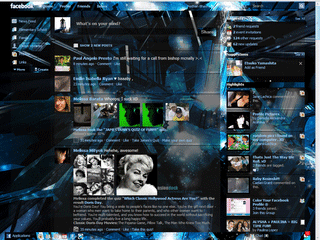
Some Examples how your facebook will look after installing Various themes :